02 / Midjourney
Where Midjourney fits in your story
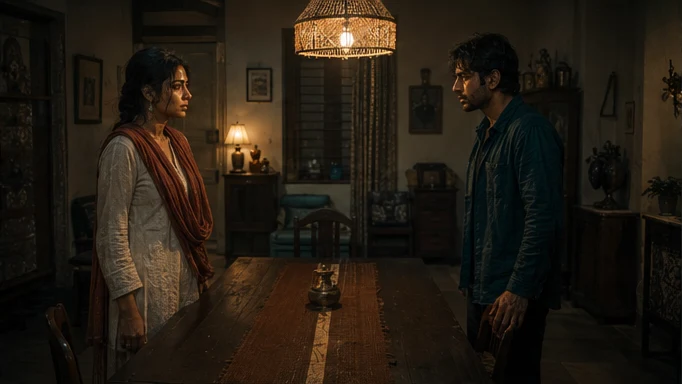
Midjourney imagery can help establish a mood board, a location treatment or a campaign’s visual direction. Tosheo can carry cleared, approved reference images into its creative canon. The AI Director then translates the chosen look into practical direction for the storyboard and subsequent video generation.
Give the interior a quiet warmth that contrasts with the cold platform outside.
- Palette
- Warm practical light against muted walls.
- Composition
- Leave a visible distance between the two characters.
- Treatment
- Document the decisions, then test them in motion.
03 / Midjourney
Plan the Midjourney handoff
The AI Director prepares the image request from the scene plan, using AI Skills to specify the framing, performance or sound intention. You can review creative preparation or use Auto mode within your chosen scope. The model receives a bounded job, with the references and constraints that matter to that asset.
For an independent creator, this connects a creative decision to the next production step. For a publisher, it keeps recurring assets attached to the episode plan. Brand buyers can carry approved product references into the shot; production houses can retain the treatment and handoff requirements across the sequence.
04 / Midjourney
From a vibe to a treatment
Exploration is genuinely valuable, and a tool that produces beautiful variance quickly is the right tool for it. The failure comes at the handover: the session ends with forty images and no statement of what makes them the same, so the next person - or the next model call - reconstructs the look by guessing.
A treatment is the written form: what the light does, what the palette is, how skin is rendered, what the grain and depth of field do, what the camera vocabulary is. Written down, it becomes approvable, inheritable and repairable.
- Light
- Sources, direction, time of day, and what the show does at night. The single most legible carrier of a look.
- Palette
- The colours the show returns to, and the ones it withholds for a reason.
- Rendering of skin and texture
- Where a drift is most visible to an audience, and hardest to describe after the fact.
- Optics
- Depth of field, grain, distortion. The properties that make two shots feel like the same lens.
- Camera vocabulary
- Which moves this show uses and what they mean. Part of the treatment, not a per-shot choice.
05 / Midjourney
Locking the treatment is the whole point
Once a treatment is approved, the router locks the provider and parameters for the scope where consistency matters. A model improving mid-season is a continuity risk rather than a free upgrade, and a repair can only reproduce an original if the original's conditions still exist.
Adopting a new version is a deliberate decision at a version boundary, with a scope, like every other canon change.
06 / Midjourney
What a reference cannot prove
Provider documentation
Capabilities checked against official sources. Story applications are Tosheo’s editorial examples, not comparative benchmarks.
Midjourney style reference guideMidjourney video guideQuestions before production
Can I bring a look I developed elsewhere?
Yes, and most productions should. What we will ask for is the treatment behind it - the written statement of what makes those images consistent - because that is what the production can actually inherit. If it does not exist yet, writing it is part of the canon stage.
Does a locked treatment mean the show can never evolve?
No. It means evolution is a decision with a version boundary and a visible scope, rather than something that happens between episode four and episode five because a provider shipped an update.
Is style consistency the same as character consistency?
No, and treating them as one is a common and expensive mistake. Style is the treatment. Identity is the approved reference set. A show can be flawless on one and broken on the other.
What if the look I want is not reproducible in video?
Better to find that out at the treatment stage than at episode three. Testing the look against the actual coverage the show uses - close, vertical, often at night - is part of approving it, and a look that only survives in stills is a look that has not been approved yet.
Do you copy a reference film's look?
We take direction from references the way any production does. We do not reproduce a protected visual identity or an identifiable artist's signature style on request, and we do not depict franchises in generated artwork.