02 / Kling
Where Kling fits in your story
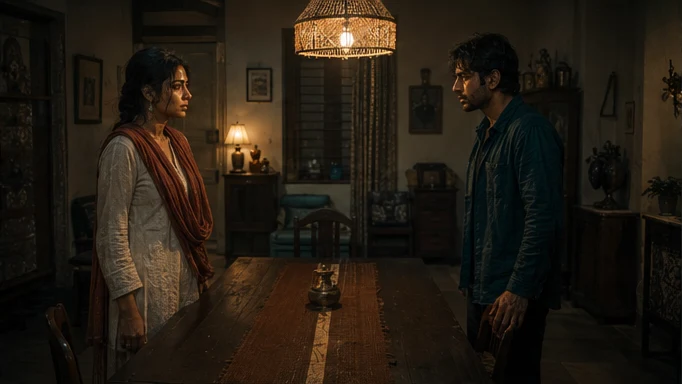
Kling is a candidate for recurring-cast coverage, character interactions and branded scenes with an approved object. The AI Director can assemble the relevant visual references and specify what changes in this shot, while preserving the story information that should carry across the sequence.
Bring Anaya and Kabir into the same room without losing the faces, costume choices or distance established earlier.
- Cast
- Attach both approved character reference sets.
- Location
- Use the established table, doorway and light direction.
- Action
- Kabir reaches forward. Anaya keeps her hand still.
03 / Kling
Plan the Kling handoff
The AI Director prepares the video request from the scene plan, using AI Skills to specify the framing, performance or sound intention. You can review creative preparation or use Auto mode within your chosen scope. The model receives a bounded job, with the references and constraints that matter to that asset.
For an independent creator, this connects a creative decision to the next production step. For a publisher, it keeps recurring assets attached to the episode plan. Brand buyers can carry approved product references into the shot; production houses can retain the treatment and handoff requirements across the sequence.
04 / Kling
Why reference handling is the deciding factor
In Tosheo a shot does not describe its characters. It references them: an approved identity set, a costume state tied to this story day, a location with approved architecture and lighting, and the geography established in the preceding shot.
That turns a provider capability into a hard routing constraint. If a family cannot accept those inputs in a form that actually binds the output, the shot cannot be routed there, because the result would be a fresh interpretation rather than the character. Headline quality does not compensate for that. A beautiful stranger is still a stranger.
- Identity references
- Face and body, approved once and inherited. The provider has to take them as input, not as adjectives.
- Location references
- Approved architecture, layout and lighting for a room the season keeps returning to.
- Continuity from the previous shot
- Where the doorway sits, who is standing where, what is on the table.
- Model restrictions
- Some source assets carry a grant that forbids their use as a generation reference. The router has to know before it dispatches.
05 / Kling
How we would judge it, once we have run enough production
The metric that matters is not a score on a public leaderboard. It is acceptance: how often work routed here, for this kind of shot, under this treatment, is accepted by a human without repair.
- Accepted shots per generation attempt, by shot type
- Continuity warnings per accepted minute
- Repair success without collateral change
- Cost per accepted publish-ready minute under this treatment
- Whether a repair can reproduce the conditions of the original
06 / Kling
Locked once approved
Provider documentation
Capabilities checked against official sources. Story applications are Tosheo’s editorial examples, not comparative benchmarks.
Kuaishou: Kling multi-image referencesQuestions before production
Does reference support guarantee a consistent character?
No, and we will not claim it does. It makes consistency achievable and, more importantly, makes a miss detectable - the result is compared against the same approved reference the shot inherited. Without that, drift is an opinion. With it, drift is a mismatch that can be repaired at shot level.
What happens if a shot cannot be routed anywhere that supports its references?
It goes back to the plan. Usually that means re-boarding the shot into something achievable rather than accepting a result that will fail QA, and the cost of that decision lands at the board stage where it is cheap.
Can a Chinese provider be used for an Indian production?
It is a rights, data and terms question answered per deliverable, not a geography question. Provider terms are part of the routing decision and are recorded in the provenance for every accepted shot, so the answer is always inspectable rather than assumed.
Do you use one provider for a whole episode?
Usually one approved treatment per scope, which in practice means a consistent provider and parameters across the episodes that have to match. Different modalities within a shot - picture, voice, music - can still route differently.
How do I know which model made my shot?
It is in the provenance: model and provider per generation attempt, the references and canon version it inherited, the parameters, every attempt rather than only the accepted one, and who accepted it. That record ships in the delivery package.