02 / LTX 2.5
Where LTX 2.5 fits in your story
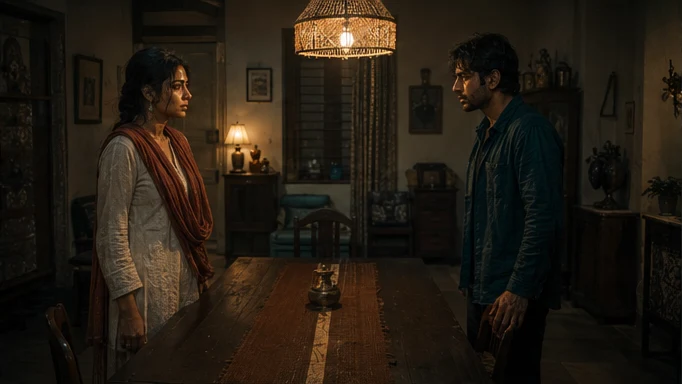
LTX 2.5 is a candidate for compact exchanges, audio-led moments and short sequences built around a clear change of viewpoint. Tosheo’s AI Director can describe the order of the shots, attach the approved starting frame and preserve the scene’s intended sound, then assess each cut against the storyboard.
Kabir reaches for the keepsake. Cut to Anaya before she answers, carrying the quiet room tone across the cut.
- Action
- Start on the hand moving towards the keepsake.
- Cut
- Move to Anaya’s reaction when the gesture registers.
- Audio
- Keep the pause and room tone connected to the exchange.
03 / LTX 2.5
Plan the LTX 2.5 handoff
The AI Director prepares the video request from the scene plan, using AI Skills to specify the framing, performance or sound intention. You can review creative preparation or use Auto mode within your chosen scope. The model receives a bounded job, with the references and constraints that matter to that asset.
For an independent creator, this connects a creative decision to the next production step. For a publisher, it keeps recurring assets attached to the episode plan. Brand buyers can carry approved product references into the shot; production houses can retain the treatment and handoff requirements across the sequence.
04 / LTX 2.5
Directing a connected LTX sequence
- 01Define the turn in the scene
Start with what changes: a character notices something, makes a decision or reveals an object. That change gives the sequence its reason to cut. More shots are not automatically more story.
- 02Assign each view a purpose
Use the wide shot to establish geography, an insert to make an object legible and a reaction to show its meaning. The AI Director can turn those choices into an ordered storyboard rather than asking the model for unspecified cinematic coverage.
- 03Choose what the sound carries
Decide whether the pause, room tone or a spoken line crosses the cut. If the voice is already an approved asset, carry its timing into the plan rather than letting an unrelated voice define the character.
- 04Review the transitions
Watch the sequence in order, then inspect each transition. A face may look convincing in isolation while the costume, eyeline or position changes between views. Accept the sequence only when its relationships remain readable.
Provider documentation
Capabilities checked against official sources. Story applications are Tosheo’s editorial examples, not comparative benchmarks.
LTX 2.5 model documentationLTX audio-video model overviewQuestions before production
What can start an LTX 2.5 video?
The documented API supports text, image and audio starting points. For Tosheo, the choice follows the approved scene: a written action, a selected visual reference or an audio asset whose timing matters to the picture.
Does LTX multi-shot generation replace the storyboard?
No. Connected generation makes the shot plan more important. The storyboard defines the information each view reveals, the order of the cuts and the continuity that the returned sequence must preserve.
Can LTX 2.5 extend or retake an existing clip?
The current LTX 2.5 API support matrix does not include retake, extend or reframe. A repair plan must use a supported workflow and an approved alternative where necessary, rather than assuming every LTX endpoint supports this version.
Where does LTX fit in a branded story?
A short product interaction can need several views: the setting, the action and the reaction. Tosheo can keep the approved product reference and campaign treatment attached to that sequence, then check object detail and brand context before accepting it.
Does using LTX open weights mean Tosheo runs it locally?
No. The availability of open weights describes the provider’s model distribution, not Tosheo’s deployment. Confirm the production access route and its requirements as part of the scope. Rights, costs and final delivery acceptance remain explicit decisions.