02 / Veo
Where Veo fits in your story
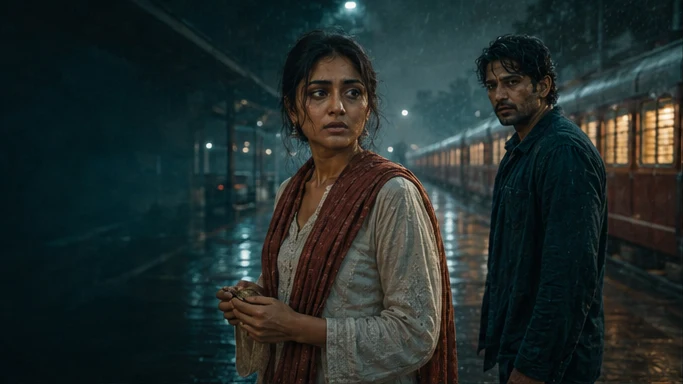
Veo is a candidate for atmosphere, scene openings and action where picture and environmental audio belong together. Tosheo’s AI Director can carry the shot’s framing, location references and sound intention into the request, then compare the result with the surrounding sequence.
Anaya hears footsteps behind her. Keep the platform quiet enough for that sound to change the scene.
- Picture
- Hold the wide frame before revealing Kabir.
- Sound
- Rain under the canopy. Footsteps enter from behind.
- Story
- Let the sound announce someone before the image does.
03 / Veo
Plan the Veo handoff
The AI Director prepares the video request from the scene plan, using AI Skills to specify the framing, performance or sound intention. You can review creative preparation or use Auto mode within your chosen scope. The model receives a bounded job, with the references and constraints that matter to that asset.
For an independent creator, this connects a creative decision to the next production step. For a publisher, it keeps recurring assets attached to the episode plan. Brand buyers can carry approved product references into the shot; production houses can retain the treatment and handoff requirements across the sequence.
04 / Veo
What it is routed for
Veo is a text- and image-to-video family from Google whose defining characteristic for a production system is that it produces audio alongside picture. Everything downstream has to account for that.
Inside Tosheo the router considers it for shots where generated audio is genuinely wanted - ambience, incidental sound, a moment where picture and sound have to be born together. It is not automatically the right destination for a dialogue shot in a production whose character voices are approved canon, because canon voices are the point of having canon voices.
- Modality
- Video with synchronised audio.
- Typical routing
- Shots where the audio is environmental rather than performance, or where picture and sound need to be developed together.
- Routing constraint
- If the shot carries approved character dialogue, the voice track is a canon asset and the model's own audio is not a substitute for it.
- Rights constraint
- Provider terms have to be acceptable for the deliverable, and a reference asset carrying a model restriction can rule the provider out entirely.
05 / Veo
What a Veo shot needs from the production
This is the part that does not change between versions, which is why this page is not about a version.
A generation request only has the production context supplied to it. It does not know that the doorway was camera-left two shots ago, that the bandage was added in episode three, that this character has not read the letter yet, or that the brand prohibits this adjacency. Each call is independent, and independence is precisely what a serialized season cannot tolerate.
- Recurring characters need explicit identity references.
- It does not know the geography established earlier in the scene.
- It does not track what a character knows or owns.
- Reference fidelity needs a separate check of the returned result.
- It cannot clear a right, authorize a budget, or accept a shot.
None of that is a criticism of the model. It is a description of where the model's job ends, and the reason a production system exists above it.
06 / Veo
What still applies above it
- 01The shot inherits canon, not a description
Identity references, costume state, location geography, story state and the voice track are attached to the unit before it is dispatched.
- 02The router bounds the job
Provider selection is constrained by the authorized cost ceiling, the rights terms, and whether the model supports the references this shot has to carry.
- 03The treatment is locked once approved
A season does not silently follow provider updates. Adopting a new version is a decision with a version boundary.
- 04The result is checked against references
Visual and narrative continuity, plus dialogue, pronunciation, captions and disclosure in the same pass.
- 05A named human accepts it
Generated seconds have no value until an authorized person accepts them for the intended delivery.
Provider documentation
Capabilities checked against official sources. Story applications are Tosheo’s editorial examples, not comparative benchmarks.
Google Veo developer guideQuestions before production
Does Tosheo use Veo?
Routing is by capability and by what is acceptable for a given deliverable, and the set of providers changes as the market does. Rather than publishing a fixed list that goes stale, we describe how a family like this is routed and what governs it. The provider used on your production is recorded in the provenance for every shot, so you always know.
Can I insist on a specific model?
You approve a treatment, which in practice fixes the provider and parameters for the scope where consistency matters. That is the level at which the choice is meaningful. Choosing per shot is a reliable way to make a season look like six different shows.
If the model generates audio, do I still need voice canon?
For any character who recurs, yes. A voice that is regenerated per shot is the audio equivalent of a face that drifts, and it fails hardest in exactly the format where the audience is meant to recognise someone. Approved voice references exist so the character sounds like one person across a season and across language tracks.
What happens when a newer version ships?
Nothing, unless someone decides otherwise. A locked treatment does not follow provider updates, because an episode that silently changes look or sound mid-season is a continuity failure with a technical cause. Adopting it is a scoped decision at a version boundary.
Is Tosheo a Veo wrapper?
No. Canon, rights, approvals, repair lineage and delivery are held outside any provider, which is what makes a production portable. Moving to a different model changes the supplier of the pixels and nothing about who your characters are or what has been approved.