02 / Luma
Where Dream Machine fits in your story
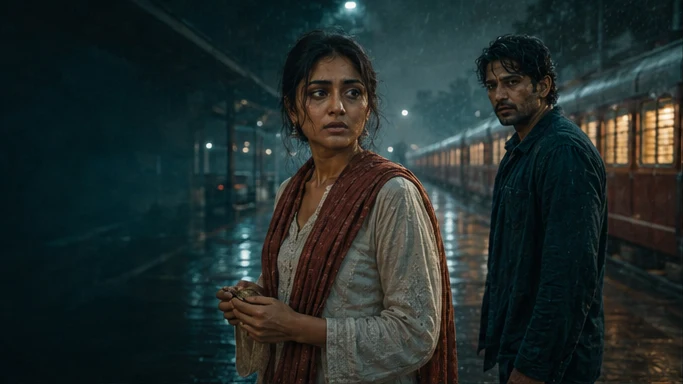
Luma is a candidate for establishing shots, spatial reveals and transitions where a deliberate camera path matters. Tosheo’s AI Director can turn the story beat into a start frame, a movement intention and an end composition, then check whether the returned move preserves the location and the cut.
Start behind Anaya and move just far enough to reveal Kabir waiting at the other end of the platform.
- Start
- Anaya in the foreground, with Kabir obscured.
- Move
- A restrained lateral reveal, motivated by her eyeline.
- Finish
- Hold both characters with clear screen geography.
03 / Luma
Plan the Dream Machine handoff
The AI Director prepares the video request from the scene plan, using AI Skills to specify the framing, performance or sound intention. You can review creative preparation or use Auto mode within your chosen scope. The model receives a bounded job, with the references and constraints that matter to that asset.
For an independent creator, this connects a creative decision to the next production step. For a publisher, it keeps recurring assets attached to the episode plan. Brand buyers can carry approved product references into the shot; production houses can retain the treatment and handoff requirements across the sequence.
04 / Luma
Camera as grammar, not garnish
Serialized work teaches its audience a visual language in the first two episodes and then relies on it. When the camera pushes in, something is being confirmed. When it holds, something is being withheld. That only works if the rules are consistent.
Generation tools invite the opposite: a different, more impressive move every time, because each shot is evaluated on its own. The result is a season where camera movement carries no information because it means something different every episode.
- The most impressive move available wins
- Movement varies without narrative reason
- The audience learns nothing from it
- Two episodes look like two shows
- Impossible to repair a shot to match
- A defined vocabulary for this production
- Movement is specified per shot in the plan
- Repetition builds meaning across episodes
- Episodes match because the rules did not move
- A repair can reproduce the original conditions
05 / Luma
The vertical constraint
A 9:16 frame changes what camera movement can do. Lateral moves have almost nowhere to go, wides lose their subject, and a push-in is one of the few moves with real room. The vocabulary a vertical series can use is genuinely smaller than a horizontal one.
That constraint belongs in the treatment and in the shot plan, which is also where it becomes a routing input: a shot specifying a particular move routes to a provider that can produce it, at the quality level the unit needs.
- The move is specified per shot in the plan, inherited rather than improvised
- Coverage is planned so a failed move does not strand a scene
- The treatment is approved once and locked for the scope
- Reduced motion is respected in derived web assets, not in the episode itself
06 / Luma
The claim we are not making about routing
Provider documentation
Capabilities checked against official sources. Story applications are Tosheo’s editorial examples, not comparative benchmarks.
Luma video generation documentationQuestions before production
Who decides the camera language?
The creator, at the treatment stage, with the practical constraints of vertical framing and the launch format in front of them. It is approved as canon and inherited, which is what keeps episode nineteen looking like episode one.
Can I specify camera moves per shot?
Yes, and that is where they belong. The compiler emits framing and camera direction per shot as part of the plan, and the animatic is where you find out whether the move works before anything is rendered at full quality.
Do camera moves make shots harder to repair?
Moving shots are generally harder to repair narrowly than static ones, which is a real production cost and a reason not to move the camera without a reason. Repair success without collateral change is tracked, and a treatment that repairs badly is a treatment worth revisiting.
Does vertical framing limit what you can shoot?
Yes, meaningfully. It is a constraint we would rather state than design around silently: fewer usable wides, less lateral movement, and a strong bias toward faces and close space. Most microdrama craft is about turning that constraint into an advantage.
Which provider handles camera motion best?
We are not going to name one. We have not run comparative benchmarks, and a ranking published without them would be exactly the kind of unsupported claim the rest of this site refuses.