02 / Nano Banana
Where Nano Banana fits in your story
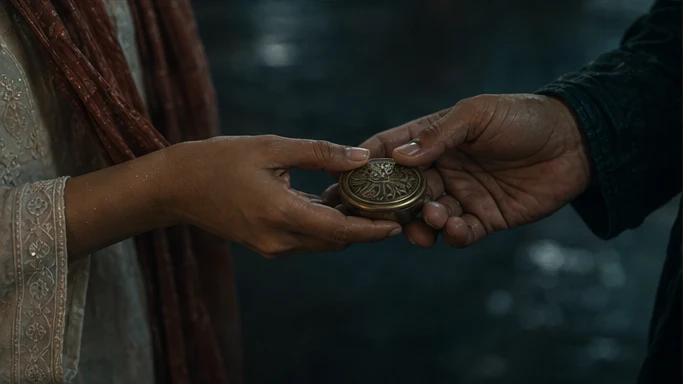
Nano Banana fits prop development, storyboard revisions and targeted changes to approved stills. The AI Director can make the intended edit explicit, preserve the original as a reference and track which scenes depend on the revised asset. For brand work, that same discipline matters when packaging or product detail changes.
Refine the brass keepsake so its shape is readable in the close-up, while checking the hands and the light around it.
- Keep
- The approved hands, framing and warm light.
- Change
- Clarify the keepsake’s shape and surface detail.
- Compare
- Inspect the entire returned frame for unintended changes.
03 / Nano Banana
Plan the Nano Banana handoff
The AI Director prepares the image request from the scene plan, using AI Skills to specify the framing, performance or sound intention. You can review creative preparation or use Auto mode within your chosen scope. The model receives a bounded job, with the references and constraints that matter to that asset.
For an independent creator, this connects a creative decision to the next production step. For a publisher, it keeps recurring assets attached to the episode plan. Brand buyers can carry approved product references into the shot; production houses can retain the treatment and handoff requirements across the sequence.
04 / Nano Banana
An edit is a repair with a different name
When an approved asset is edited, the production is doing the same thing it does when it repairs a shot: replacing the smallest wrong unit while preserving everything approved around it, and keeping the relationship between the original, the change, the approval and the final deliverable.
So an edit is not a fresh generation that happens to look similar. It is a versioned operation with a scope, and it is governed by the same rules.
- The original is kept, not overwritten
- The reason for the edit is recorded
- The approver and the version they saw are recorded
- The delivered asset states which version it carries
- Collateral change outside the edited region is a failure, not a side effect
05 / Nano Banana
Editing a canon asset is a canon change
This is where an edit model needs the most care. Editing a shot affects a shot. Editing an approved identity reference affects everything that inherits it, which may be an entire season.
Tosheo treats that as what it is: a canon change with a computed downstream scope, approved by a named person who can see what it would touch, with accepted work preserved by default.
The rust dupatta in Anaya's approved costume state is edited to a different weave.
- Operation
- Edit on an approved canon asset
- Scope shown
- Every episode and track inheriting that state
- Already accepted
- Preserved unless explicitly included
- Recorded
- Original, edit, reason, approver, scope
The same edit applied without a scope computation would either silently invalidate accepted episodes or produce a season where the weave changes at an arbitrary point. Neither is acceptable, and both are the default behaviour of an editing tool with no production model behind it.
06 / Nano Banana
Where a discovered look stops being reproducible
Provider documentation
Capabilities checked against official sources. Story applications are Tosheo’s editorial examples, not comparative benchmarks.
Google Gemini image generation guideQuestions before production
Can every problem be fixed with an edit?
No. A framing problem is not a region, and a performance that reads wrong is not a pixel. Some fixes require regenerating the shot and a few require re-boarding the scene. The commitment is to use the smallest unit that actually fixes the problem, not to pretend every problem is small.
What is collateral change?
Anything that moved outside the region you asked about - lighting, skin tone, a background object, the grade. It is the most common way an edit makes a shot worse while appearing to fix it, and it is why repair success is measured as success without collateral change rather than just success.
Does an edit break provenance?
It extends it. The provenance records the original, the edit, the model that performed it, the reason, the approval, and which deliverable carries which version. An edit that vanished from the record would make the delivery manifest a work of fiction.
Can I edit an accepted episode after delivery?
Yes, as a new version with its own approval, and the delivered version remains part of the record. What does not happen is an accepted asset being silently replaced - approved work is not regenerated or altered without permission.
Is editing cheaper than regenerating?
It depends on the model, the requested change and how many attempts are needed. Compare the actual estimate before choosing the repair route. Attempts per accepted repair is tracked alongside attempts per accepted shot, so when an edit stops being the cheaper route we can see it.